
Every year, Apple releases an iOS update that promises to make the iPhone more personal, more capable, and more intelligent. Most of the time, those promises feel incremental. A new widget here, a tweaked animation there, a feature that’s nice but not transformative. But the next major iPhone update — iOS 18, which Apple unveiled in mid-2024 — is different. It’s the kind of software release that changes how you actually use your phone on a daily basis, not just how it looks. And after spending weeks with the beta, I can say with confidence that millions of users are going to have their routines quietly rewritten.
The headline feature is Apple Intelligence, Apple’s long-awaited entry into the generative AI race. But calling it an "AI update" sells it short. What Apple has built is a system-wide intelligence layer that touches nearly every app you open, every message you send, and every photo you take. It’s not a chatbot you open when you’re bored. It’s a background assistant that’s always there, always context-aware, and genuinely useful in ways that Siri never was. Combined with a completely redesigned home screen, new privacy protections, and deeper customization than iOS has ever allowed, this update feels like the biggest shift in iPhone software since the App Store launched.
Apple Intelligence: The Feature That Changes Everything
Let’s start with the big one. Apple Intelligence is Apple’s answer to ChatGPT, Gemini, and Copilot, but it’s integrated in a way that those services can’t match because they don’t own the operating system. When you’re writing an email in Mail, Apple Intelligence can suggest rewrites that sound more professional, more friendly, or more concise. When you’re texting in Messages, it can generate context-aware replies based on the conversation thread. When you’re overwhelmed with notifications, it summarizes them into a single, digestible paragraph.
What makes this different from other AI assistants is privacy. Apple processes most of these requests on-device using the Neural Engine, meaning your emails, texts, and photos aren’t sent to a cloud server for analysis. For more complex tasks, Apple uses Private Cloud Compute, a system that processes data on Apple’s servers without storing it. The company claims it can’t access your information even if it wanted to — a stark contrast to the data-hungry models from Google and OpenAI.
The daily impact is subtle but pervasive. I found myself using the writing tools constantly — not because I can’t write, but because having a second pair of eyes that suggests a better phrasing in real time is genuinely helpful. The notification summaries alone saved me from notification fatigue. Instead of 15 individual alerts from a group chat, I get one summary: "Sarah asked about dinner plans, Mike suggested 7 PM, and three people reacted with thumbs up." It’s the kind of thing that sounds small until you realize how much mental clutter it removes.
A Home Screen You Can Actually Customize
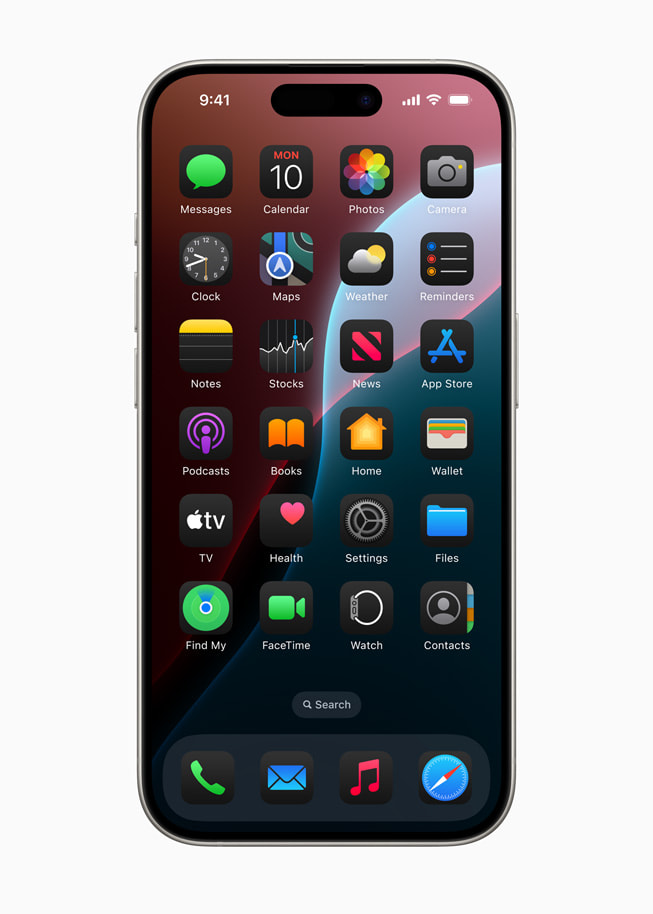
For years, iPhone users have looked at Android’s flexible home screens with envy. iOS 18 finally closes that gap — and in some ways, surpasses it. You can now place app icons and widgets anywhere on the grid, not just in the top-left-to-bottom-right order that Apple dictated for 17 years. Want a single app in the bottom right with empty space around it? You can do that. Want to arrange icons around a wallpaper photo so they don’t cover someone’s face? That’s possible too.
But the bigger change is icon theming. iOS 18 lets you apply a unified color treatment to all your app icons — light mode, dark mode, automatic, or a custom tint that matches your wallpaper. You can also make icons larger, removing the app labels entirely for a cleaner look. It’s not just cosmetic. A home screen that feels like yours, rather than a grid that Apple designed, changes how you interact with your phone. I found myself opening apps I’d forgotten about because they were no longer buried on page three. The visual organization made my phone feel less like a utility and more like a space I control.
Photos Gets the Overhaul It Deserved
The Photos app in iOS 18 has been completely rebuilt, and it’s one of the most successful redesigns in recent Apple history. The new interface is a single, unified grid that surfaces your best photos automatically, organized by themes like people, pets, trips, and events. But the real magic is the new Collections feature, which groups photos into curated stories that update over time.
Apple Intelligence plays a role here too. The Clean Up tool lets you remove unwanted objects or people from photos with a tap — not by blurring the background, but by intelligently filling in the space with what should have been there. It’s not perfect, but for simple distractions like photobombers or stray power lines, it works surprisingly well. And because it runs on-device, there’s no upload delay or privacy concern.
For anyone with thousands of photos — which is most iPhone users — the new Photos app finally makes browsing feel manageable. The old app was a chronological dump that made finding anything a chore. The new one is a curated experience that surfaces memories you actually want to see. I’ve found myself opening Photos just to browse, something I rarely did before.
Privacy Gets Smarter and More Granular
Apple has always positioned itself as the privacy-first alternative to Google, and iOS 18 pushes that further. The new Locked and Hidden apps feature lets you lock any app behind Face ID, Touch ID, or a passcode. When an app is locked, its notifications are hidden, its content doesn’t appear in search, and it can’t be opened without authentication. This is a big deal for apps like banking, dating, or health tracking — anything you don’t want visible if someone borrows your phone.
There’s also a new Privacy Dashboard that shows which apps have accessed your microphone, camera, location, or contacts in the past week. It’s simple, visual, and genuinely useful for catching apps that are overreaching. I discovered a weather app that had been pinging my location every 15 minutes — far more than necessary — and revoked its permission. The dashboard makes these audits easy, which means more people will actually do them.
Messages, Mail, and Safari Get Meaningful Upgrades
iOS 18 isn’t just about the headline features. The apps you use every day got real improvements too. In Messages, you can now schedule texts to send later — perfect for birthday wishes at midnight or work messages you don’t want to send at 11 PM. You can also apply text effects to any word or phrase, not just the full-screen animations that iMessage previously offered. And Tapbacks, the quick reaction feature, now works with any emoji, not just the six pre-selected options.
Mail introduces automatic categorization, sorting your inbox into Primary, Transactions, Updates, and Promotions — similar to Gmail, but running entirely on-device. Safari gets a new Highlights feature that uses Apple Intelligence to summarize web pages and pull out key information like restaurant hours or recipe ingredients without you having to scroll. And the new Passwords app finally breaks password management out of Settings into its own dedicated space, making it easier to manage passkeys, Wi-Fi passwords, and verification codes.
Pros & Cons of iOS 18’s Major Changes
| Feature | Pros | Cons |
|---|---|---|
| Apple Intelligence | System-wide AI, on-device privacy, genuinely useful writing and summary tools | Requires iPhone 15 Pro or later; older devices excluded |
| Customizable Home Screen | Free icon placement, theming, larger icons for accessibility | Can look messy if over-customized; no third-party icon packs |
| Photos Redesign | Curated collections, automatic highlights, clean-up AI tool | AI clean-up occasionally produces artifacts; not always perfect |
| Locked Apps | Granular privacy control, hidden notifications, peace of mind | Extra authentication step every time you open a locked app |
| Scheduled Messages | Send texts at optimal times, no more late-night apologies | Only works iMessage-to-iMessage; SMS falls back to immediate send |
Expert Tip
Here’s the setting that made the biggest difference in my daily use: turn on notification summaries for group chats and social apps, but leave them off for work and family. The sweet spot is letting Apple Intelligence handle the noise while keeping the signal untouched. I was skeptical at first — summaries felt like I was giving up control — but after a week, I realized I was checking my phone 30% less often because I wasn’t being pulled into every minor update. Go to Settings > Notifications > Summarize Previews and customize it per app. It takes five minutes to set up and pays off immediately.
FAQ
Will iOS 18 work on my iPhone?
iOS 18 supports iPhone XS and later. However, Apple Intelligence features require an iPhone 15 Pro or Pro Max, or an iPhone 16 model, due to the Neural Engine requirements. Older devices get the home screen customization, Photos redesign, and privacy features, but not the AI tools.
Is Apple Intelligence really private?
Apple processes most AI tasks on-device using the Neural Engine. For complex requests, it uses Private Cloud Compute, which processes data on Apple servers without storing it. Apple claims it cannot access your data, and independent security researchers are auditing the system. It’s more private than cloud-based alternatives, but no system is perfectly immune to vulnerabilities.
Can I downgrade if I don’t like iOS 18?
Apple typically stops signing older iOS versions within a week or two of a new release, making downgrades impossible after that window. If you’re unsure, wait for the first point update (iOS 18.1) before upgrading, when early bugs are usually fixed.
Does the new home screen customization drain battery?
No. The home screen changes are purely cosmetic and have no measurable impact on battery life. The AI features in Apple Intelligence do use more power during active processing, but the impact is minimal for typical use.
Will third-party apps support Apple Intelligence?
Apple is opening Apple Intelligence to developers through an API, so third-party apps will be able to integrate writing tools, image generation, and notification summaries over time. Expect major apps to adopt these features throughout 2024 and 2025.
Final Thoughts
iOS 18 is the kind of update that doesn’t scream for attention on day one. The changes are woven into the fabric of daily use — a smarter notification, a better-phrased email, a home screen that finally feels like yours. It’s only after a few weeks that you realize how much the experience has improved. The phone feels less like a device you tolerate and more like a device that understands you.
That’s the real significance of this release. Apple Intelligence isn’t a gimmick or a chatbot bolted onto the side. It’s a foundational shift in how the iPhone operates, and it’s going to influence every app, every interaction, and every update for years to come. The customizable home screen and privacy improvements are welcome additions, but the AI layer is what makes this update matter. For millions of users, iOS 18 won’t just change how they use their phones. It will change what they expect their phones to do.
🎥 Recommended Video
https://www.youtube.com/results?search_query=iOS+18+new+features+Apple+Intelligence+review

No comments:
Post a Comment