
Walk into any coffee shop in 2026 and you'll hear the same conversation at half the tables. Someone is using ChatGPT to rewrite an email. Another person is generating product images with Midjourney. A freelancer across the room just automated their entire invoicing workflow with an AI agent they built in twenty minutes. AI tools aren't the future anymore. They're the present, and they're everywhere.
But if you're just getting started, the landscape feels overwhelming. Hundreds of tools. Dozens of categories. Pricing tiers that range from free to "contact sales." Everyone promises to 10x your productivity, but nobody explains where to actually begin. This guide cuts through the noise and gives you a clear starting point — no coding required, no enterprise budget needed, and no PhD in machine learning.
The Three Categories That Actually Matter
You don't need to learn every AI tool on the market. For beginners, there are only three categories worth your attention right now: writing and research assistants, image and design generators, and automation tools. Master one from each, and you'll already be ahead of most people.
Chat & Writing Assistants
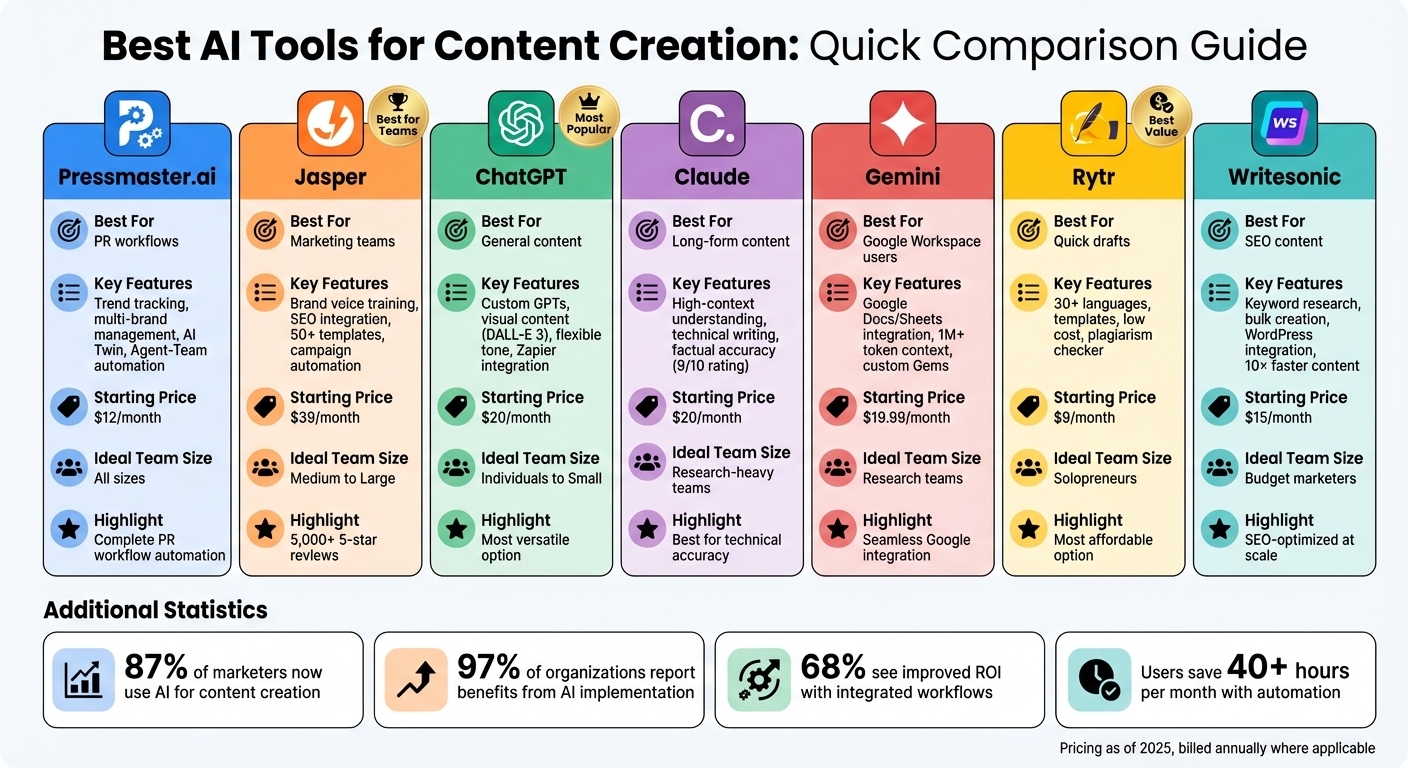
This is where most people start, and for good reason. Tools like ChatGPT, Claude, and Google Gemini can draft emails, summarize long articles, brainstorm ideas, explain complex topics, and even help you code. In 2026, these models are significantly more capable than they were even a year ago. They handle longer documents, remember context across conversations, and produce output that rarely needs heavy editing.
ChatGPT remains the most versatile starting point. Claude excels at long-form writing and nuanced reasoning. Gemini integrates deeply with Google Workspace, making it ideal if you live in Docs and Gmail. For beginners, pick one and use it daily. The learning curve is essentially zero — you type what you want, and it responds.
Image & Design Generators
Midjourney, DALL-E 3, and Adobe Firefly have made professional-quality image creation accessible to anyone who can type a sentence. Need a social media graphic? A logo concept? A photo for a blog post? These tools generate it in seconds. The quality gap between AI-generated and stock photography has nearly disappeared for web and social use.
Adobe Firefly is the safest choice for commercial work since it's trained on licensed content. Midjourney produces the most visually stunning results but requires a subscription for commercial rights. DALL-E 3 is built into ChatGPT, making it the most convenient for beginners who want text and images in one place.
Automation & Productivity
This is where AI gets genuinely transformative. Tools like Notion AI, Microsoft Copilot, and Zapier's AI features automate repetitive tasks that used to eat your day. Notion AI can summarize meeting notes and generate action items. Copilot drafts documents and analyzes spreadsheets inside apps you already use. Zapier connects hundreds of apps and uses AI to build workflows from plain English descriptions.
For beginners, start with whatever tool is already in your workflow. If you use Microsoft 365, Copilot is the obvious choice. If you're a Notion user, their AI features are built right in. Don't buy new software just for AI — extend what you already have.
What Beginners Should Ignore (For Now)
Not every shiny AI tool deserves your attention. Voice cloning, deepfake video generation, and custom AI model training are fascinating but require significant expertise, ethical caution, and often expensive hardware. Coding assistants like GitHub Copilot are incredible, but if you don't write code, they're irrelevant.
Similarly, don't get distracted by the flood of "AI-powered" apps that are really just ChatGPT with a different wrapper. If a tool doesn't do something meaningfully different from what you can already do in ChatGPT or Claude, it's probably not worth a separate subscription.

Beginner-Friendly AI Tools Compared
| Tool | Best For | Free Tier? | Learning Curve | Monthly Cost |
|---|---|---|---|---|
| ChatGPT | General writing, research, coding help | Yes | None | Free / $20 Pro |
| Claude | Long-form writing, nuanced analysis | Yes | None | Free / $20 Pro |
| Midjourney | Stunning visuals, art, concept design | No | Low | From $10 |
| Adobe Firefly | Commercial-safe images, design | Yes (credits) | Low | Included with Creative Cloud |
| Notion AI | Note-taking, summaries, workflows | Limited | Low | $10 per user |
| Microsoft Copilot | Office documents, email, spreadsheets | Yes | Low | Free / $20 Pro |
Pros & Cons of Diving Into AI Tools
| Pros | Cons |
|---|---|
| Dramatically speeds up writing and research tasks | Easy to become over-reliant and stop thinking critically |
| Reduces cost of professional-quality images and design | Output often requires fact-checking and human editing |
| Automates repetitive work you used to do manually | Subscription costs can stack up quickly across multiple tools |
| Levels the playing field for solo creators and small teams | Ethical and copyright concerns around AI-generated content |
Expert Tip
Don't subscribe to five AI tools at once. Pick one writing assistant and one image or productivity tool, then use them daily for a month before adding anything else. The biggest mistake beginners make is treating AI like a magic wand they wave occasionally. It only becomes useful when it's integrated into your actual workflow. I started with ChatGPT for drafting and Notion AI for meeting notes. Six months later, those two tools alone save me roughly six hours every week. Start small, build habits, and expand only when you hit a clear limitation. Chasing every new AI release is a recipe for subscription fatigue and shallow expertise.
FAQ
Do I need to pay for AI tools to get real value?
No. The free tiers of ChatGPT, Claude, and Microsoft Copilot are incredibly capable for personal and light professional use. Paid tiers mostly unlock higher usage limits, faster responses, and advanced features. Start free and upgrade only when you consistently hit a wall.
Can AI tools replace human creativity?
Not really. AI is exceptional at generating first drafts, brainstorming, and handling repetitive tasks. But the final creative decisions — tone, strategy, emotional resonance — still require human judgment. Think of AI as a skilled assistant, not a replacement.
Is it safe to put company data into AI tools?
It depends. Free versions of ChatGPT and Claude may use your inputs to improve their models. If you're handling sensitive information, use enterprise versions with data privacy guarantees, or stick to tools like Microsoft Copilot that run within your existing secure environment.
What's the best AI tool to learn first?
ChatGPT or Claude. They're free, require zero setup, and immediately improve your writing, research, and problem-solving. Once you're comfortable there, branch into image generation or workflow automation based on your actual needs.
How do I keep up with new AI tools?
You don't need to. The core tools — ChatGPT, Claude, Gemini, Midjourney, Copilot — are improving so rapidly that they absorb features from smaller apps. Follow one or two tech newsletters, but focus on mastering what you have rather than chasing every new launch.
Final Thoughts
AI in 2026 isn't some distant technology you need to prepare for. It's already in your browser, your phone, and probably your workplace software. The gap between people who use AI effectively and people who don't is widening every month, but the barrier to entry has never been lower.
You don't need to become an expert overnight. You need to start. Pick one tool. Use it for something real — a work email, a blog post, a presentation slide. Get comfortable with asking it questions and refining its output. That's it. The rest is just practice.
The ultimate beginner guide to AI isn't about knowing every tool. It's about losing the fear of trying them. The best time to start was last year. The second best time is today.
━━━━━━━━━━━━━━━━━━
🎥 Recommended Video
https://www.youtube.com/results?search_query=beginner+guide+AI+tools+2026

No comments:
Post a Comment