
I was three months into my YouTube Premium subscription when I did the math and realized I’d spent $42 to skip ads on a platform I mostly use for background music and cooking tutorials. Don’t get me wrong, Premium is nice. The ad-free experience, background playback, and offline downloads are genuinely convenient.
But $14 a month adds up to nearly $170 a year. For a lot of people, that’s a utility bill, not a streaming perk. So I spent a week testing every free alternative I could find, from browser tricks to third-party apps, to see how close I could get to the Premium experience without opening my wallet.
The results were better than I expected. Here’s what actually works, what’s a waste of time, and how to build a near-Premium experience for free.
What YouTube Premium Actually Gives You
Before hunting for alternatives, it helps to know exactly what you’re trying to replace. YouTube Premium bundles four main features: ad-free video playback, background playback on mobile, offline downloads, and access to YouTube Music Premium.
For most users, the ad-free experience is the big draw. Background playback matters if you listen to long podcasts or music while doing other things. Offline downloads are great for flights or commutes with spotty signal. YouTube Music is a nice bonus, but it’s not why most people subscribe.
The good news? You can replicate about 80% of the Premium experience without paying a dime. The bad news? You’ll need to mix a few methods depending on which device you’re using. Here’s the breakdown.
Free Method 1: Browser Ad Blockers on Desktop
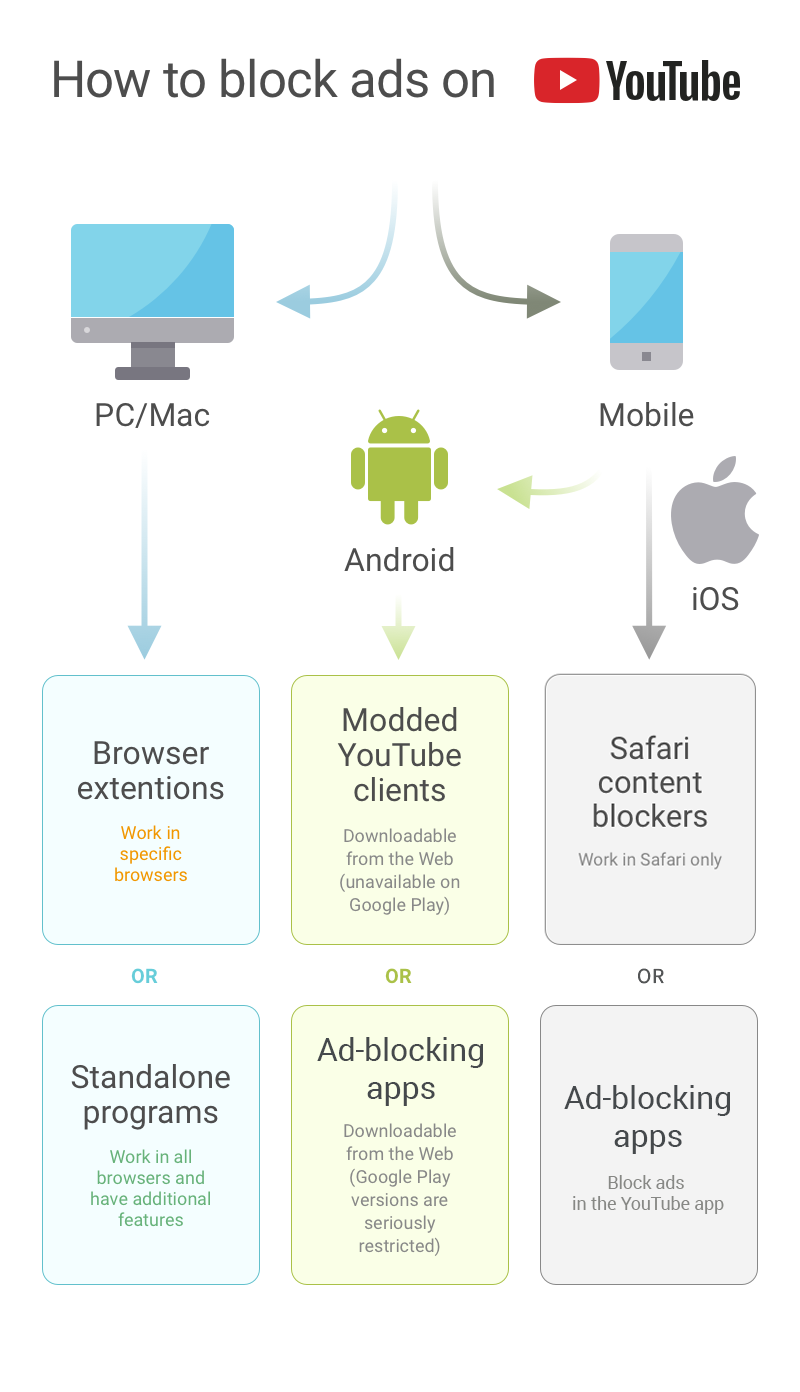
On a computer, this is the easiest win. Install a reputable ad blocker like uBlock Origin or AdGuard in your browser, and YouTube ads basically disappear. Pre-roll ads, mid-roll interruptions, banner overlays, all gone.
I tested this across Chrome, Firefox, and Edge for a full week. uBlock Origin was the most reliable, catching every ad format without breaking the site. AdGuard was a close second and had a slightly cleaner interface. Both are completely free.
The catch? This only works in the browser. If you prefer the YouTube desktop app or watch on a smart TV, this method won’t help. But for laptop and desktop users, it’s a flawless replacement for the ad-free part of Premium.
Free Method 2: Brave Browser on Mobile
Mobile is trickier. Apple and Google both restrict ad blockers inside the official YouTube app, so you need to get creative. The simplest solution I found was switching to the Brave browser on my phone.
Brave has built-in ad and tracker blocking that works on YouTube’s mobile website. You won’t get the polished app experience, but you will get ad-free playback. The interface is responsive enough that after a day, I barely noticed the difference.
For background playback, Brave supports picture-in-picture mode on both Android and iOS. It’s not as seamless as native background audio, but it works if you just need to listen while checking a text or browsing another app.
Free Method 3: NewPipe and LibreTube (Android Only)
If you’re on Android and want a more app-like experience, NewPipe and LibreTube are worth exploring. These are open-source YouTube frontends that strip out ads, support background playback, and even allow downloads.
NewPipe has been around longer and feels more stable. LibreTube is newer but has a slicker interface. Both are free, privacy-focused, and available through F-Droid or direct APK download since Google blocks them from the Play Store.
I used NewPipe for three days as my primary YouTube client. It handled subscriptions, playlists, and background playback without issues. The only downside is no login support, so your watch history and recommendations don’t sync with your Google account.
Free Method 4: Safari Content Blockers on iOS
iPhone users have fewer options, but they’re not out of luck. Safari content blockers like 1Blocker or Wipr can block YouTube ads when you watch through the mobile website instead of the app.
It’s not perfect. Some ad formats slip through occasionally, and you lose the convenience of the native app. But for casual viewing, it’s a solid compromise. Pair it with Safari’s picture-in-picture support, and you’ve got a workable ad-free setup.
One pro tip: add YouTube’s mobile site to your home screen as a web app. It opens in full screen without Safari’s address bar clutter, making it feel almost like the real thing.
What About Smart TVs and Consoles?
This is where free alternatives hit a wall. Smart TVs, Roku, Apple TV, and game consoles run locked-down versions of the YouTube app that don’t support ad blockers or third-party clients. Your options are limited.
The most reliable workaround is screen mirroring or casting from a phone or laptop that already has ads blocked. It’s clunky, but it works. Another option is using a Raspberry Pi with Pi-hole on your home network, which can block ads at the DNS level for every device connected to your Wi-Fi.
Pi-hole is more technical to set up, but it’s a one-time project that protects every device in your house. If you’re comfortable with a little networking, it’s the most comprehensive free solution available.
Free vs. Premium: What You Actually Miss
| Feature | Free Alternatives | YouTube Premium |
|---|---|---|
| Ad-free videos | ✅ Easy on desktop, moderate on mobile | ✅ Native, all devices |
| Background playback | ⚠️ Partial via PiP or third-party apps | ✅ Full native support |
| Offline downloads | ⚠️ NewPipe/LibreTube only, no sync | ✅ Native, synced across devices |
| YouTube Music | ❌ Not included | ✅ Full access included |
| Smart TV support | ❌ Very limited | ✅ Full native support |
Pros & Cons of Going Free
✅ Pros
- Saves $170+ per year without sacrificing much functionality
- Desktop ad blocking is effortless and highly effective
- Open-source alternatives respect privacy better than Google
- Forces you to be intentional about what you watch
❌ Cons
- Mobile experience requires workarounds and compromises
- No seamless smart TV or console support
- You lose synced watch history and personalized recommendations
- Third-party apps can break when YouTube updates its backend
Expert Tip
If you watch YouTube primarily on a laptop or desktop, you can replicate about 95% of the Premium experience for free with just uBlock Origin and a little patience. If you’re a heavy mobile or TV viewer, the math changes, and Premium starts looking like a reasonable convenience tax.
My personal setup now is a hybrid: uBlock Origin on my laptop, Brave on my phone, and I cast to my TV when needed. I canceled Premium two months ago and haven’t missed it. But if YouTube Music is part of your daily routine, the subscription might still be worth it since there’s no free equivalent bundled in.
FAQ
Is using an ad blocker on YouTube legal?
Yes, ad blockers are legal to use. However, YouTube’s terms of service discourage them, and the platform has been testing methods to block ad blockers or limit functionality for users who employ them. It’s an ongoing cat-and-mouse game.
Will YouTube ban my account for using ad blockers?
Currently, YouTube is not banning accounts for using ad blockers. At most, they may show a popup asking you to disable the blocker or allow ads. You can usually dismiss these warnings and continue watching.
What’s the best free alternative for background playback?
On Android, NewPipe offers the most reliable background playback. On iOS, Safari’s picture-in-picture mode is your best free option. Neither is as smooth as Premium’s native background audio, but both get the job done.
Can I download videos for free like Premium allows?
NewPipe and LibreTube both support downloads on Android. On desktop, browser extensions like Video DownloadHelper can save videos locally. Just be aware that downloading YouTube videos violates their terms of service, even if enforcement is rare for personal use.
Should I just pay for Premium anyway?
If you value convenience above all else, Premium is fairly priced for what you get. But if you’re budget-conscious and mostly watch on desktop or mobile browsers, the free alternatives are surprisingly capable. Try the free route first, upgrade only if you hit a wall.
🎥 Recommended Video
Watch: How to Watch YouTube Without Ads Free 2026Final Thoughts
YouTube Premium is a good product, but it’s not the only path to a clean viewing experience. For desktop users, ad blockers are a no-brainer. For mobile users, Brave and NewPipe cover most needs. And for the technically inclined, Pi-hole turns your entire home network into an ad-free zone.
The free alternatives require more effort and occasional compromise, but they also give you something Premium doesn’t: control. No Google account dependency, no subscription anxiety, and no feeling like you’re locked into another monthly bill.
I’m not here to tell you to cancel Premium. If it makes your life easier, keep it. But if you’re on the fence, or if that $14 a month is starting to sting, know that the free world is more capable than YouTube wants you to believe. Test the alternatives. You might surprise yourself.

No comments:
Post a Comment