
My phone kept screaming at me about storage. I’d delete a few photos, clear some downloads, and the warning would vanish for maybe a day. Then it’d come back, angrier than before. I was convinced my phone was haunted — or worse, that I needed to shell out for a cloud storage plan I didn’t want.
Turns out, the real culprits were hiding in plain sight. After a deep dive into my storage settings, I found gigabytes of space being eaten by things I never even thought to look for.
The Storage Audit That Changed Everything
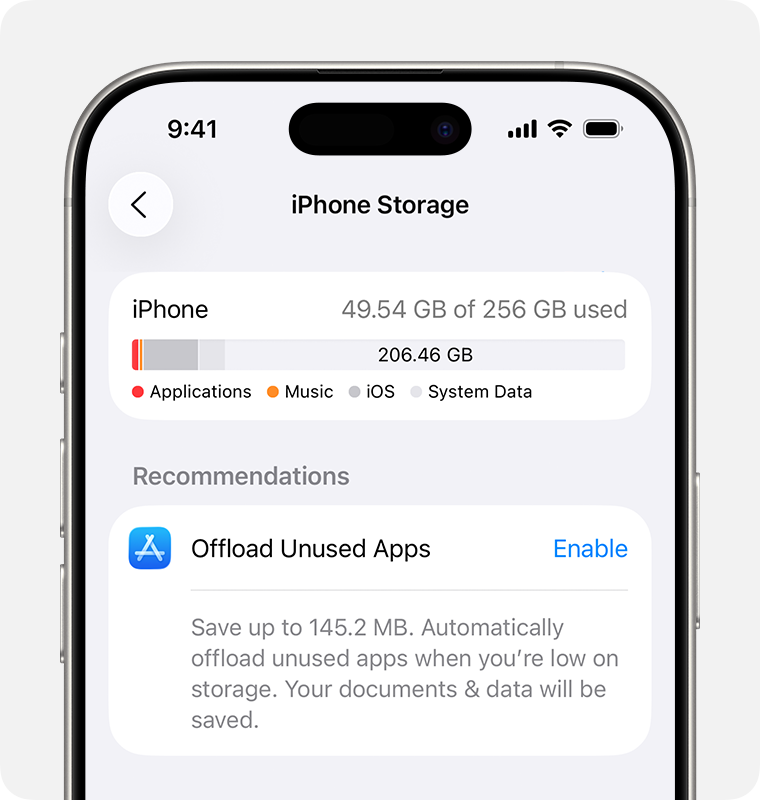
The first step was actually looking at what was taking up space. On iPhone, that’s Settings > General > iPhone Storage. On Android, head to Settings > Storage (or Device care > Storage on Samsung). The breakdown was eye-opening.citeweb_search:7#2web_search:7#8
I expected photos and videos to dominate. They didn’t. What shocked me was how much space was tied up by apps I barely used, cached data I’d never cleared, and system files that had quietly ballooned over months. Research shows that when your storage drops below 10–15% free, your phone enters a kind of survival mode — app performance can drop by 100% to 300%, and in extreme cases, system lag spikes by over 2000%.citeweb_search:7#8
The Hidden Cache Monster
Cached data was the biggest surprise. Every app on your phone stores temporary files — images, scripts, videos — so it loads faster the next time you open it. That’s the idea, anyway. In reality, apps like TikTok, Instagram, and Facebook hoard cached media you’ve already watched, sometimes for months.citeweb_search:7#3web_search:7#4
On Android, you can clear cache per app by going to Settings > Apps > [App name] > Storage > Clear cache. It’s safe — your login info and settings stay intact, but the temporary junk gets wiped. On iPhone, there’s no universal “clear all cache” button, which is honestly frustrating. You have to clear Safari history and website data from Settings, or offload and reinstall individual apps to flush their caches.citeweb_search:7#6web_search:7#10
After clearing caches for my social apps and browser, I freed up nearly 4GB. Four gigabytes. From temporary files I couldn’t even see.
WhatsApp and Messaging Apps: The Silent Space Eaters
Here’s one I never saw coming. My messaging apps were storing every photo, video, and GIF anyone had ever sent me — automatically. WhatsApp alone was sitting on over 6GB of chat media I didn’t even know existed.
On iPhone, you can check this by going to Settings > General > iPhone Storage > Messages and browsing the attachments. On Android, the default Google Messages app doesn’t auto-download media unless you changed that setting, but WhatsApp definitely does. Go into WhatsApp settings and turn off “Save to Camera Roll” on iPhone or “Media visibility” on Android to stop the flood.citeweb_search:7#2
I deleted old chat attachments and turned off auto-save. Instant relief.
System Data and “Other” Storage
Both iPhone and Android have a mysterious category called System Data or Other. It’s a catch-all for temporary files, logs, Siri voices, cached system resources, and update files. On iPhone, this can balloon to 10GB or more over time.
The fix is oddly simple: restart your phone. A full reboot forces iOS or Android to purge temporary system files that should’ve been deleted already. I restarted my iPhone and watched the System Data category shrink by nearly 3GB. No app required.citeweb_search:7#1
Offline Downloads You Forgot About
Netflix episodes. Spotify playlists. YouTube Premium downloads. Podcast episodes. Offline maps. These are all invisible storage hogs because they live inside apps, not your photo gallery or Downloads folder.
I found two seasons of a show I’d finished watching months ago still sitting in Netflix, plus a Spotify playlist I’d downloaded for a single flight. Combined, that was another 5GB. Check the downloads section inside each streaming or music app — it’s usually the fastest way to reclaim large chunks of space without touching anything personal.citeweb_search:7#8
Apps You “Might Use Someday”
My app library was a graveyard of impulse downloads. A meditation app I used twice. Three different photo editors. Games I’d forgotten existed. On iPhone, the “Offload Unused Apps” feature is genuinely useful — it removes the app itself but keeps your data and documents, so if you reinstall later, everything’s exactly where you left it.citeweb_search:7#2web_search:7#8
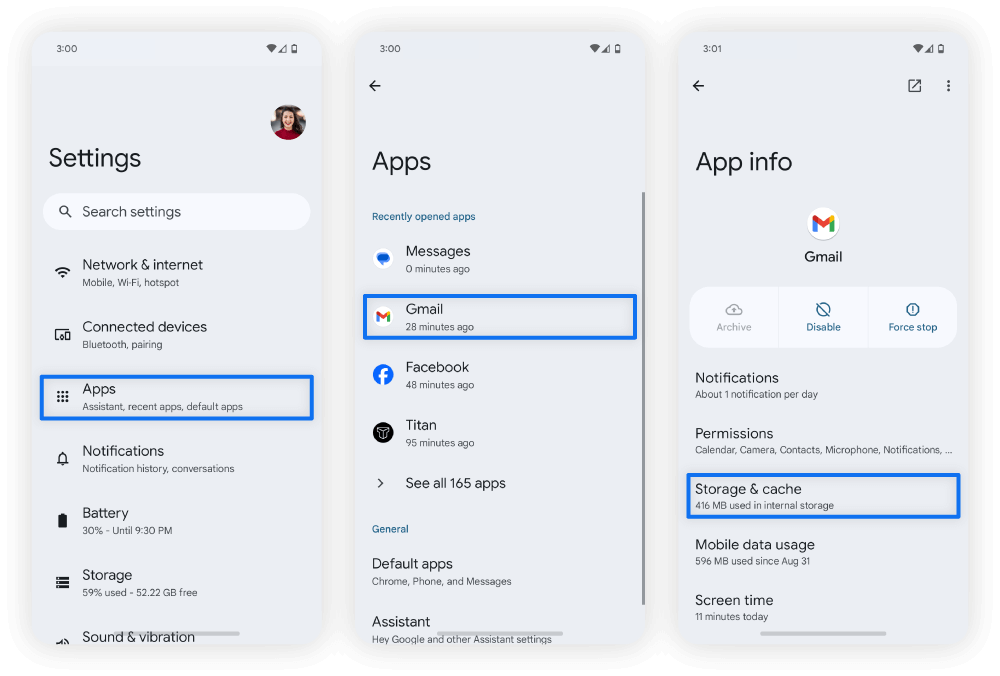
On Android, some phones offer an “Archive” feature that works similarly. For apps you know you’ll never touch again, just uninstall them. Your data is usually synced to the cloud anyway.
Pros & Cons at a Glance
| Pros | Cons |
|---|---|
| Clearing cache is safe and can free up several GB instantly | iPhone has no universal cache clear button — must be done per app |
| Restarting your phone can shrink bloated System Data | Some apps will load slightly slower after clearing cache |
| Disabling auto-save in chat apps prevents future bloat | Deleting offline downloads means re-downloading later |
| Offloading apps preserves data while reclaiming space | System Data will gradually grow again over time |
| Most fixes are free and require no new hardware | Requires regular maintenance — not a one-time fix |
Expert Tip
Set a monthly 10-minute reminder to audit your storage. Check your biggest apps, clear caches, and review downloads. It’s boring, but it prevents the slow creep that turns a 128GB phone into a daily frustration. Also, keep at least 10–15% of your total storage free at all times. Your phone needs that breathing room to move temporary files around, install updates, and run smoothly. Drop below that threshold and you’ll notice lag, app crashes, and failed photo saves.citeweb_search:7#8
FAQ
Why does my phone say storage is full when I don’t have many apps?
Because storage hides in places you don’t notice — cached social media videos, messaging app attachments, browser data, offline downloads, and system temporary files. These can add up to dozens of gigabytes without ever showing up in your photo gallery.citeweb_search:7#1web_search:7#8
Is clearing cache safe? Will I lose anything important?
Yes, it’s safe. Clearing cache only removes temporary files like images, scripts, and videos apps stored to load faster. Your login credentials, settings, and personal data stay intact. The app may load slightly slower the first time after clearing, but that’s it.citeweb_search:7#5web_search:7#3
How do I stop my phone from filling up again?
Turn off auto-save in messaging apps like WhatsApp. Disable automatic media downloads in chat apps. Clear caches monthly. Offload or uninstall apps you haven’t opened in 90 days. And keep 10–15% of your storage free as a buffer.citeweb_search:7#2web_search:7#8
What’s the fastest way to free up space right now?
Delete large videos first — they’re the biggest space hogs per file. Then remove offline downloads from Netflix, Spotify, and YouTube. Clear chat media in WhatsApp or Messages. Finally, clear app caches and restart your phone to flush system temporary files.citeweb_search:7#8
Should I just buy more cloud storage?
Cloud storage helps with photos and videos, but it won’t fix the root problem if your phone is bloated with cached data, app downloads, and system files. Clean your phone first, then use cloud storage for backup — not as a band-aid for poor storage habits.citeweb_search:7#1
Final Thoughts
After spending an afternoon hunting down the real space hogs, I freed up over 18GB without deleting a single photo I cared about. The biggest wins were clearing app caches, purging forgotten offline downloads, and turning off auto-save in WhatsApp. My phone went from constantly nagging me to running like it was new.
The lesson? Storage problems rarely come from the obvious places. Your photo gallery isn’t the villain — it’s the invisible junk accumulating in the background, quietly eating space you didn’t know you had. A little detective work in your settings goes a long way, and the fixes are mostly free, fast, and surprisingly satisfying.
So before you upgrade your phone or pay for more cloud storage, do the audit. You might be shocked at what’s hiding in there.
🎥 Recommended Video
https://www.youtube.com/results?search_query=phone+storage+full+hidden+files+cache+cleanup+2026

No comments:
Post a Comment