
My phone used to last a full day without breaking a sweat. Now I’m hunting for a charger by 2 PM, and I haven’t changed my habits at all. Same apps. Same brightness. Same routine. But the battery percentage drops like a stone, and I’m left wondering what happened to the phone that once felt unstoppable.
If this sounds familiar, the answer isn’t that you’re using your phone more. It’s that your phone’s battery is quietly dying — and several other factors are speeding up the process.
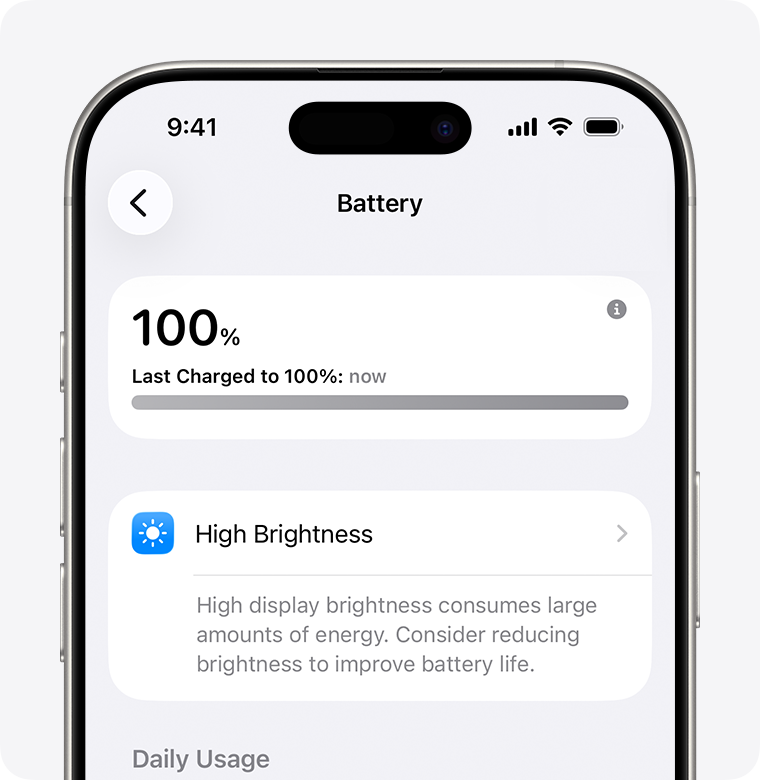
The Inevitable Truth: Batteries Age, Whether You Like It or Not
Every smartphone runs on a lithium-ion battery, and lithium-ion cells have a finite lifespan. Each charge cycle — going from 0% to 100% — causes microscopic wear inside the battery. Over hundreds of cycles, the battery’s ability to hold a charge degrades. Apple designs iPhone batteries to retain roughly 80% of their original capacity after 500 full charge cycles for older models, and about 1,000 cycles for iPhone 15 and newer. Once you cross that threshold, the decline accelerates.
But here’s what most people don’t realize: you don’t need to hit 500 cycles to see degradation. Heat, charging habits, and software demands all compound the problem. A two-year-old phone with 400 cycles that’s been fast-charged daily in a warm environment will perform worse than a three-year-old phone with 600 cycles that was treated gently.
The result? Your phone reports 100% charge, but that 100% is based on a shrinking total capacity. It’s like a gas tank that gets smaller every month — you’re filling it up, but there’s less to fill.
Heat Is the Silent Killer
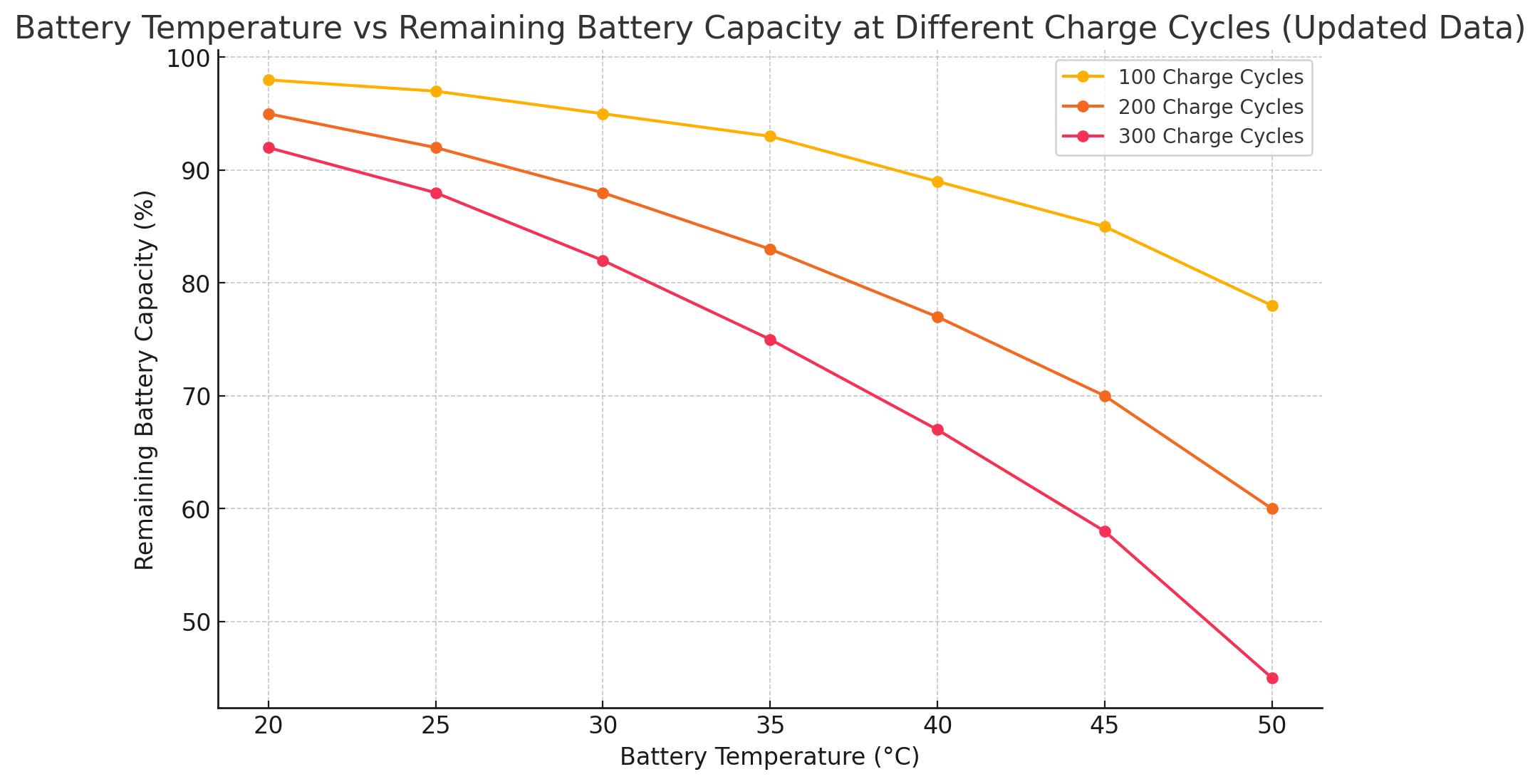
If there’s one thing lithium-ion batteries hate, it’s heat. Temperatures above 35°C (95°F) cause permanent chemical damage that accelerates aging. Gaming while charging, leaving your phone in direct sunlight, or using it outdoors on a hot day all push the battery past its comfort zone.
The damage is cumulative and irreversible. Once a battery has been exposed to sustained heat, it never fully recovers. That’s why phones that have been through a summer of heavy use often feel noticeably worse by fall — the heat has already done its work.
I learned this the hard way. Last summer, I used my phone for navigation while it charged on my car’s dashboard. By September, my battery health had dropped from 92% to 78%. The phone wasn’t broken — it had just been cooked.
Fast Charging: Convenient Now, Costly Later
Fast charging is one of the best smartphone innovations of the past decade. It’s also one of the worst things you can do for long-term battery health. Lithium-ion cells charge fastest up to about 85% capacity, then require a slower saturation phase to reach 100%. Fast-charge systems push more current through the battery, generating extra heat and stressing the internal chemistry.
Over time, this stress adds up. Batteries that are regularly fast-charged to 100% degrade faster than those charged slowly. The ideal charging range is 20% to 80% — staying in the middle of the battery’s capacity minimizes stress on the cells. Both iOS and Android now offer features like Optimized Battery Charging and Battery Protection that pause charging at 80% when they predict an overnight plug-in, but most people either don’t enable them or override them when they need a quick top-up.
Your Screen Is Eating More Than You Think
The display is still the single biggest battery drain on any smartphone, typically consuming 20–30% of total power. High brightness, 120Hz refresh rates, and OLED screens showing bright colors all multiply that consumption. On OLED displays, white and bright backgrounds use significantly more power than dark mode, because every lit pixel draws energy.
But the real issue is that screens have gotten bigger, brighter, and more power-hungry over time while battery technology has only improved incrementally. A 2026 flagship with a 6.7-inch 120Hz OLED panel draws far more power than a 2024 phone with a 60Hz LCD — even if the battery is technically larger. Your usage habits haven’t changed, but the hardware demands have.
Background Apps and Connectivity: The Hidden Tax
Modern smartphones are constantly connected — 5G, Wi-Fi, Bluetooth, GPS, and push notifications all running simultaneously. When cellular signal is weak, your phone works harder to maintain the connection, sometimes using 50% more power than in strong coverage areas. GPS tracking, background app refresh, and location services keep the CPU and radios awake even when the screen is off.
Apps like social media, maps, and ride-sharing services are particularly aggressive. They request location updates every few seconds, sync data in the background, and trigger notifications that wake the screen. Individually, each of these actions is tiny. Collectively, they create a constant low-level drain that didn’t exist on phones from five years ago.
Software Updates That Demand More
Every major OS update adds features, animations, and background processes that require more power. The same phone that ran smoothly on Android 14 may struggle with Android 17’s AI-powered features and enhanced animations. It’s not that the update is broken — it’s that the software has outpaced the hardware.
Apple and Google optimize for their newest devices. Features designed for the latest flagship often run inefficiently on older hardware, forcing the processor to work harder and the battery to drain faster. Your phone isn’t getting worse at being a phone — the software is just asking more of it than it was designed to give.
Pros & Cons at a Glance
| Pros | Cons |
|---|---|
| Battery replacement restores performance at a fraction of new phone cost | Lithium-ion degradation is irreversible — no software fix can restore capacity |
| Optimized charging features can slow degradation if used consistently | Fast charging convenience comes with long-term battery health cost |
| Dark mode and lower brightness provide immediate battery relief | Modern screens and 5G connectivity inherently consume more power |
| Restricting background apps and location services extends daily life | Software updates often increase demands beyond older hardware’s design |
| Heat management habits can prevent accelerated aging | Battery degradation accelerates after the 80% health threshold |
Expert Tip
Check your battery health before blaming software. On iPhone, go to Settings > Battery > Battery Health & Charging. On Android, Samsung users can check via Samsung Members > Get Help > Interactive checks > Battery. Pixel users can find estimated capacity in Settings > Battery > Battery Health. If your capacity is below 80%, a replacement will make your phone feel brand new again — often for under $100. Until then, enable optimized charging, use dark mode, keep brightness under 50%, and avoid charging past 80% when you don’t need a full charge. Small habits compound into meaningful extra months of usable battery life.
FAQ
Why does my phone battery drain faster as it gets older?
Lithium-ion batteries degrade with every charge cycle, losing their ability to hold a full charge. Heat, fast charging, and software demands accelerate this process. Once battery health drops below 80%, performance throttling may also kick in to prevent unexpected shutdowns.
Does fast charging damage my battery?
It can. Fast charging generates more heat and pushes more current through the battery cells, which stresses the internal chemistry over time. Using optimized charging features and avoiding charging to 100% every time can help mitigate the damage.
Should I replace my battery or buy a new phone?
If your phone is otherwise working well, battery replacement is almost always the smarter choice. It costs a fraction of a new device, restores full performance, and eliminates the need to transfer data and reconfigure everything. Many users report their phone feels brand new after a replacement.
How can I make my battery last longer each day?
Enable dark mode, reduce screen brightness, turn off background app refresh for non-essential apps, disable location services for apps that don’t need them, and use Wi-Fi instead of cellular when possible. Also, avoid using your phone while it’s charging and keep it out of direct sunlight.
Is it bad to charge my phone overnight?
Modern phones have safeguards, but keeping a battery at 100% for hours overnight still causes minor stress. Optimized charging features delay the final 20% until you typically wake up, which helps. If your phone doesn’t have this feature, consider using a smart plug to cut power once it reaches 80%.
Final Thoughts
Your phone battery isn’t failing because you’re doing something wrong. It’s failing because lithium-ion chemistry has physical limits, and modern smartphone usage pushes those limits harder than ever. Bigger screens, faster refresh rates, 5G connectivity, AI features, and constant background activity all demand more from a battery that’s simultaneously aging from the inside out.
The good news is that most of the drain is addressable. Check your battery health. Adjust your charging habits. Manage heat exposure. And if your capacity has dropped below 80%, consider a replacement before you write off the entire device. A new battery can transform a frustrating phone back into a reliable one — and it costs a lot less than you think.
Your phone isn’t broken. Its battery is just tired. And batteries, unlike most things in tech, can actually be fixed.
🎥 Recommended Video
https://www.youtube.com/results?search_query=phone+battery+draining+fast+reasons+fix+2026

No comments:
Post a Comment